Settings
Configure autosave, language, emulators, Signing Team, MCP, AI, Jira, Amplitude and App Store Connect, and run the Setup check.
Open Settings with Cmd+, or Astra Scout → Settings…. The window has a sidebar of panes: General, Android (emulators), iOS, Intelligence (MCP, AI and AI CLI), Jira, Amplitude and App Store. Changes apply as you make them, except where a Save button is shown.
General
- Autosave: save changes to files after a short delay.
- Language: System, English or Tiếng Việt. It takes effect the next time the app starts.
- Updates: Astra Scout checks for a new version once a day and asks before it installs it. Turn off Automatically check for updates to check only with Check for Updates… (also in the Astra Scout menu). See Updating.
Astra Scout follows the macOS appearance (Light or Dark) and has no theme setting.
Emulators
Android SDK: the path to your Android SDK. Leave it empty if the SDK is in a default location. Astra Scout then finds it through ANDROID_HOME, ANDROID_SDK_ROOT or ~/Library/Android/sdk. Type a path or click Choose Folder… to override. The pane shows which SDK was detected and where it came from.
iOS
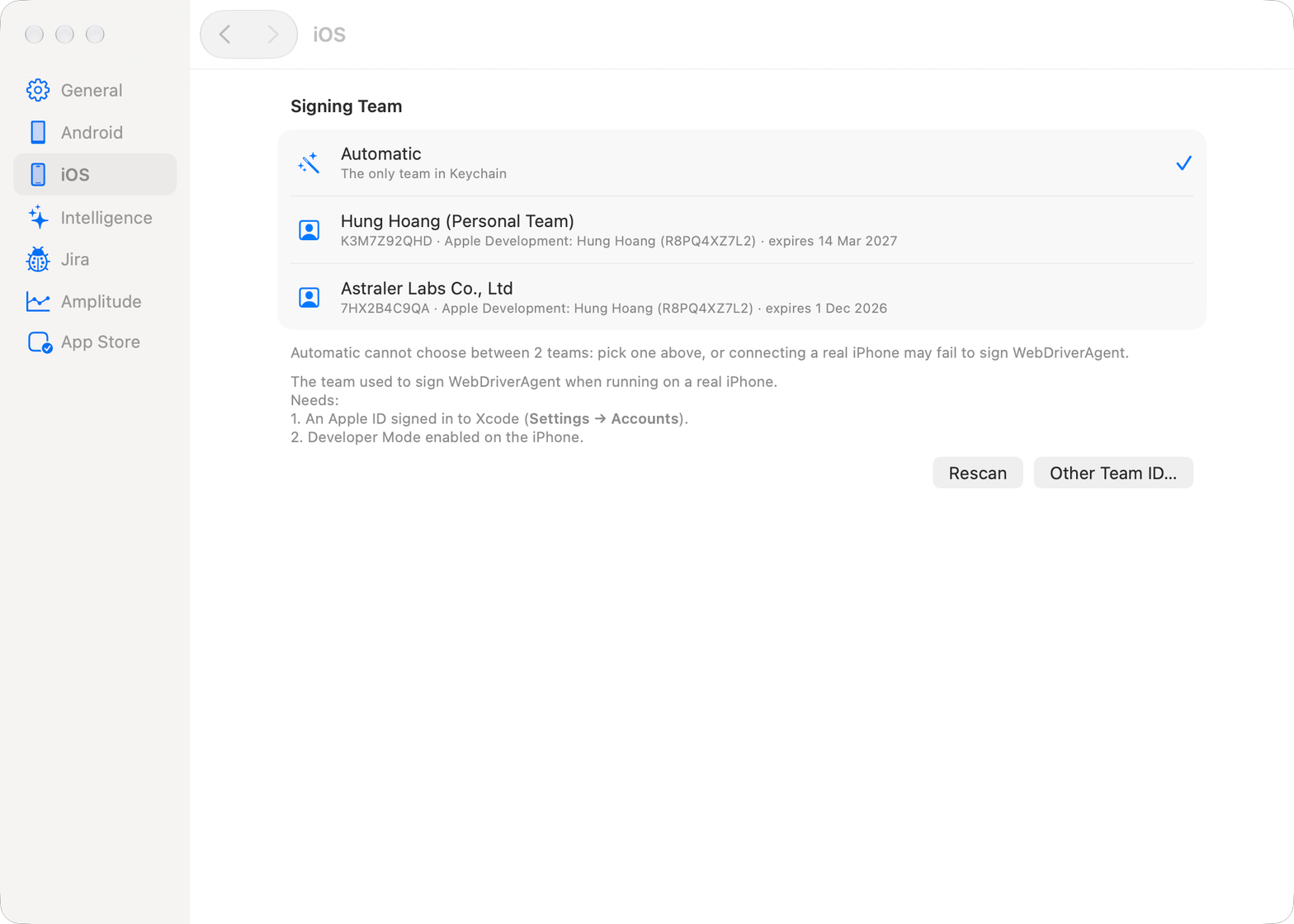
Under Signing Team, choose the Team used to sign WebDriverAgent when you run on a real iPhone, rescan the Keychain, or enter a Team ID by hand. The app file used by clearState is chosen from the toolbar's app menu → App for Real iPhone, not here. See Devices.
MCP
Turn on Enable connection from CLIs (MCP), copy the URL and token, and see the Activity from CLIs. See The scout plugin.
AI
The Default provider, a model and CLI path for each provider, AI commands in flows and App context. See AI assistant.
AI CLI
Shows whether the scout plugin is installed in Claude Code, Codex and Gemini CLI. The app does not embed a terminal: it shows the exact command to install or update the plugin, with Copy and Run buttons, and nothing runs until you press Run. See The scout plugin.
Jira
Connect Jira and set the site, project, issue type, labels, components, language and options. See Jira.
Amplitude
Click Add Project… at the foot of the section to open the Amplitude Project sheet (Edit Amplitude Project for an existing one), enter the Amplitude project (API key and Secret key) that runs are read back from, add app keys with the New app key row and + (select a key, then − removes it), and turn on forwarding per project. The switch Receive events from devices on the network makes the capture listener (port 5051) reachable from other devices on your Wi-Fi. Turn it on for a real iPhone or Android; the Simulator and emulators do not need it. It applies after the server restarts (Restart Server Now). See Tracking.
App Store
The pane is titled App Store Connect.
Add the App Store Connect API key (Issuer ID, Key ID and .p8 file), choose a sandbox tester and set its subscription renewal rate. See Sandbox testers.
Setup check
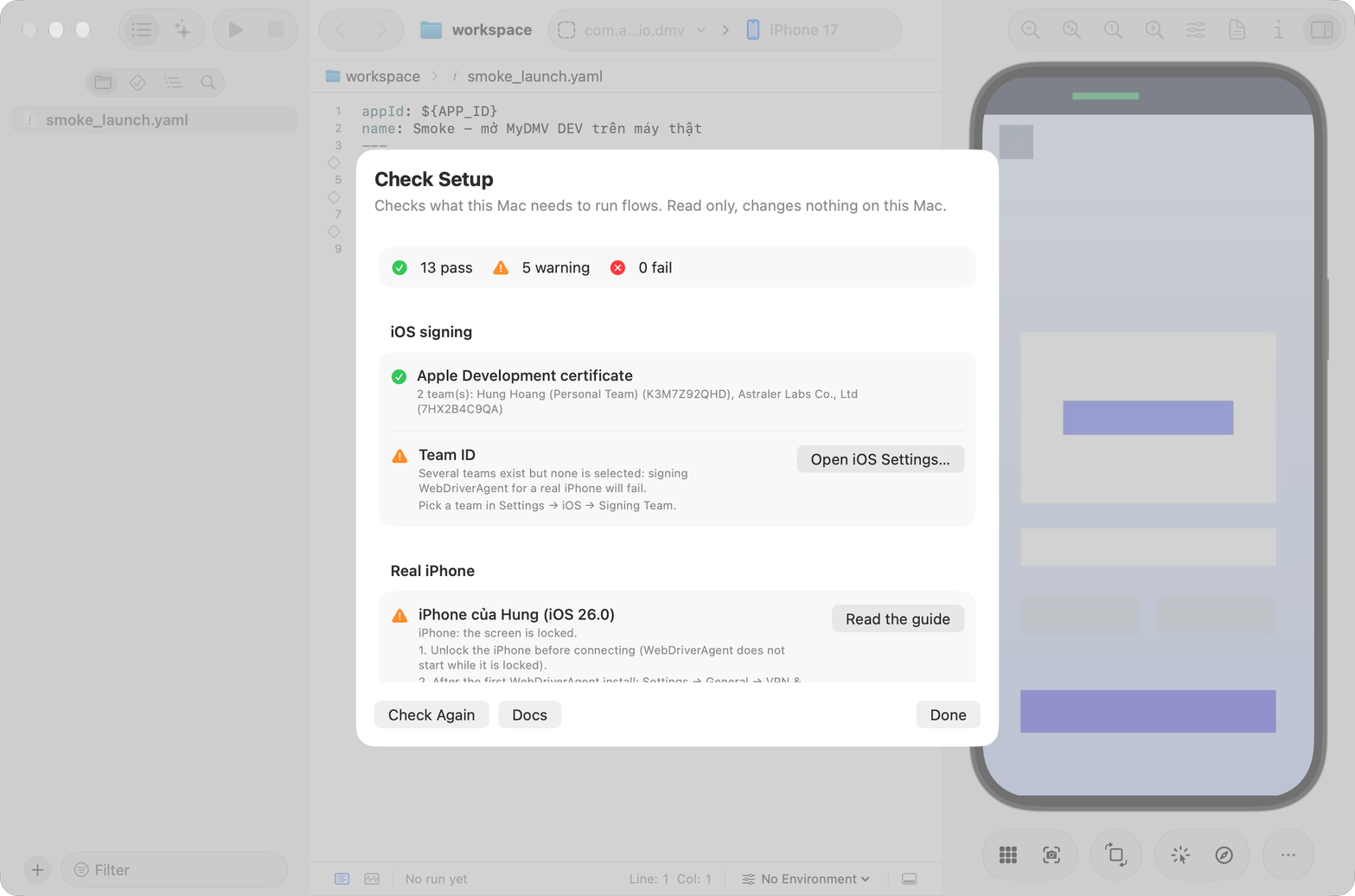
Help → Setup Check… opens a sheet that inspects your machine and tells you how to fix each item. The checks are read-only and change nothing. Click Check Again after each fix, Docs to open the documentation, and Done to close. The summary reads like "5 pass · 1 warning · 0 fail".
| Group | What it checks |
|---|---|
| Xcode | Xcode is present and xcode-select points to it, the version, the license and first launch, Command Line Tools, and an iOS runtime for simctl. These items are required. |
| iOS signing | An Apple Development certificate in the Keychain, the Team ID in use, and a warning for a Personal Team (7-day profile). |
| Real iPhone | For each plugged-in iPhone: trusts the Mac, Developer Mode, locked or unlocked, Developer Disk Image, the Auto-Lock reminder, and Direct iPhone control (HID). |
| Mirror & video | xcuiax runs (optional), and ffmpeg (optional). |
| Android | The SDK and adb, an AVD, and USB debugging allowed on the device. |
| AI | A CLI is installed and signed in. |
| macOS permissions | Local Network (iPhone over Wi-Fi). |
Items with an error or warning can have a button that opens the matching Settings pane or the guide.
The app also runs this check in the background on first launch and shows This Mac is not set up enough to run flows when something required is missing.