The scout plugin
Drive Astra Scout from Claude Code, Codex CLI, or Gemini CLI through MCP to run, write, and fix flows.
The scout plugin lets Claude Code, OpenAI Codex CLI and Gemini CLI drive Astra Scout while it runs on your Mac, through MCP. From your terminal you can run Maestro flows, write flows from a description, fix failing flows, explore the app as a user, check tracking and diagnose your setup.
The plugin only contains skills, commands and MCP configuration. It has no binary, no session-start hook and no scripts that run on your machine. All device work is done by Astra Scout.
Skills
| Skill | Use it to |
|---|---|
run-flow | Run a flow from a file or pasted YAML and see per-command results, video and crashes |
write-flow | Write a new flow from a description, read real text and ids from the screen, validate, save (asks before overwriting) and try it |
fix-flow | Run Astra Scout's auto-fix loop on a failing flow, review the diff and save only if you agree |
explore-app | Explore the app as a persona and get a Markdown report with suggested flows |
check-tracking | Run a flow, then check its Amplitude events against the catalog named in the flow header (tracking-specs/<app>.yaml) and its assertEvents steps, and explain failing or N/A rules |
device-setup | Use Setup check to find and fix Xcode, Team ID, Developer Mode, Android SDK and AI CLI problems |
Commands: /scout:setup checks that Astra Scout is running, the MCP URL is right, MCP is enabled and the token is set, and shows install steps for each CLI. /scout:doctor runs the setup check. Codex has no /scout:… commands, so ask it to "run scout setup" or type $ to choose a skill.
Install with buttons (recommended)
The native app bundles the plugin.
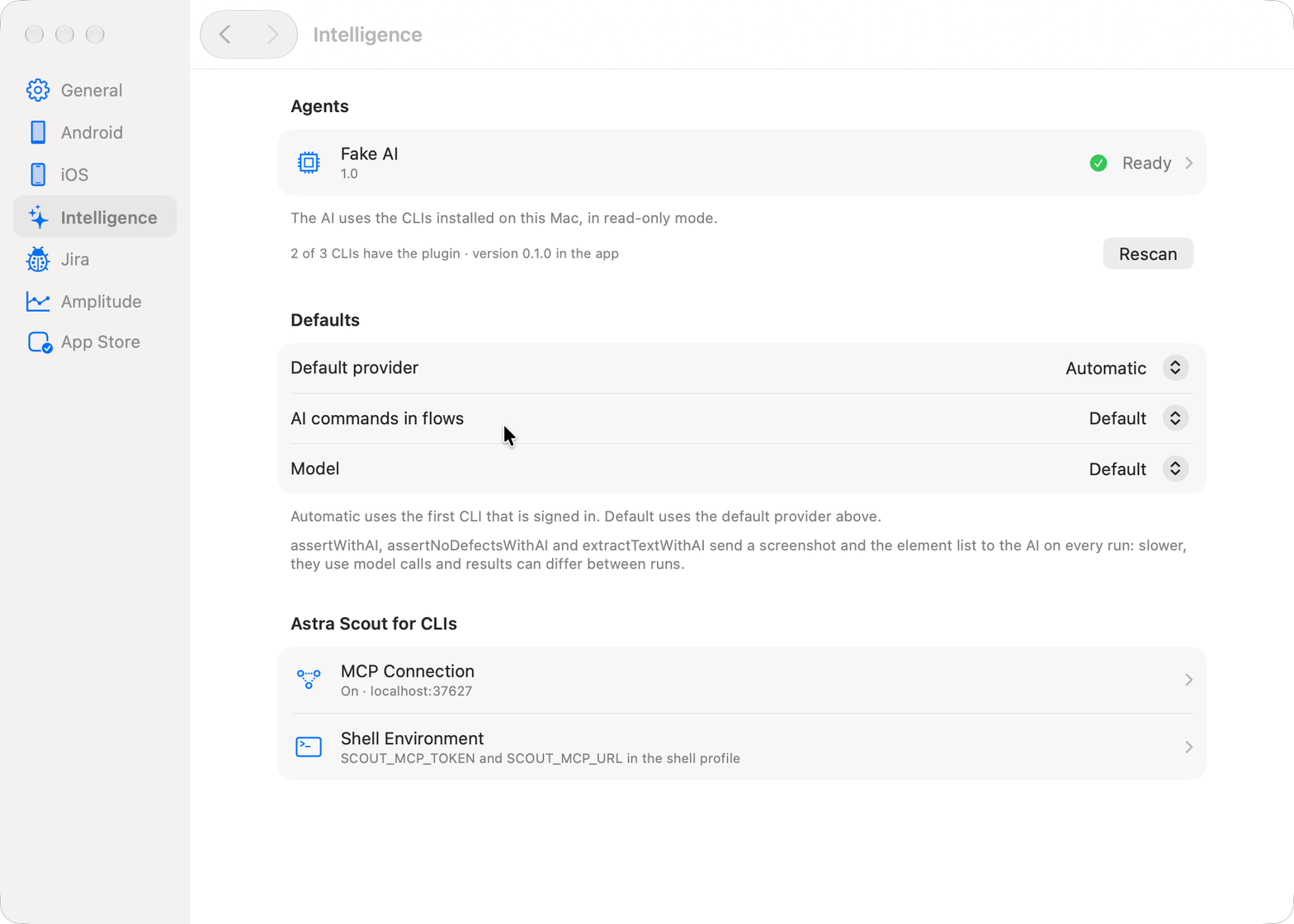
- Open Settings → AI CLI. Each CLI shows a status: Not installed, Installed (version), Update needed, CLI not signed in or CLI not found, plus a line Agent coverage: N/M CLIs have the plugin.
- Click Install (or Update) on a CLI's row. The app copies the bundled plugin to
~/.astra-scout/pluginand shows the command under Command. Read it, then click Run (or Copy to run it yourself in a terminal). Output appears in a log below the command, and the status rechecks when it finishes. Nothing runs until you click Run. - Click Add SCOUT_MCP_TOKEN to the shell. The command it shows appends one line to your shell profile that reads the token from Astra Scout's
mcp-tokenfile. The token is not shown, and running it twice does not add duplicates. - If Astra Scout is not on port 5050, also click Set SCOUT_MCP_URL.
- Restart the CLI and run
/scout:setup.
The app has no embedded terminal. Every command can be copied and run in your own terminal.
Install by hand
If you installed the plugin to ~/.astra-scout/plugin with the buttons, use that path. Otherwise use the plugin/ folder of the repository.
| CLI | Install | Update |
|---|---|---|
| Claude Code | claude plugin marketplace add ~/.astra-scout/plugin && claude plugin install scout@astra-scout | claude plugin marketplace update astra-scout && claude plugin update scout@astra-scout |
| Codex | codex plugin marketplace add ~/.astra-scout/plugin && codex plugin add scout@astra-scout | Same as install |
| Gemini CLI | gemini extensions install ~/.astra-scout/plugin | gemini extensions update scout |
Check the connection: in Claude Code, /mcp should show plugin:scout:astra-scout connected. In Codex, codex mcp list. In Gemini CLI, gemini mcp list.
Use only one way to connect. If you added an astra-scout MCP server by hand, remove it so tools are not listed twice.
The MCP token
Open Settings → MCP. MCP is enabled by default at
http://localhost:5050/mcp.Click Copy token. The token is generated on first run and stored in
mcp-tokenin the data folder (~/Library/Application Support/Astra Scout/data/mcp-tokenfor the native app).Put it in an environment variable. The plugin only reads it from there:
bashecho "export SCOUT_MCP_TOKEN='<token>'" >> ~/.zshrc exec zsh
Create a new token (the circular arrow next to the token) creates a new one. CLIs using the old token are rejected until you update the variable.
If Astra Scout is not on port 5050
The app falls back to another port when 5050 is busy and writes the real URL to ~/.astra-scout/mcp.json. The simplest fix is to free port 5050 and reopen the app. Otherwise point your CLI at the new URL:
| CLI | How |
|---|---|
| Claude Code, Gemini CLI | export SCOUT_MCP_URL='http://localhost:<PORT>/mcp', then restart the CLI |
| Codex | codex mcp add astra-scout --url http://localhost:<PORT>/mcp --bearer-token-env-var SCOUT_MCP_TOKEN |
Any other CLI that supports MCP over streamable HTTP can use a server named astra-scout at that URL with the header Authorization: Bearer ${SCOUT_MCP_TOKEN}.
What you can ask
- "List the devices, then run
flows/samples/settings_smoke.yamlon an iPhone simulator" - "Write a flow: open Settings, go to General, check that About is visible. Save it in samples/"
- "
mydmv/smoke_launch.yamlfails. Auto-fix it for up to 3 rounds and show me the diff before saving" - "Explore the onboarding as a newcomer, 25 steps, and write a report"
- "Run
mydmv/onboarding_paywall_skip.yaml, then check tracking" (the flow header namesmydmv/tracking-specs/mydmv.yaml) - "The iPhone will not connect and says it requires a development team. Please check."
Safety
run_flow,run_command,autofix_flowandexplore_apprun right away on test devices, without a confirmation. The only tool that needs your approval isreport_bug: open Astra Scout and approve it under Awaiting confirmation, which says which CLI asked. No tool lets a CLI confirm for itself.- There is no tool to delete files or run shell commands.
save_flowdoes not overwrite without your agreement, and all paths stay inside the workspace. One run per device at a time. - Read-only tools are pre-allowed. Tools that write or act on a device (
save_flow,run_flow,run_command,autofix_flow, connecting a device) follow your CLI's normal permission prompts. - Every MCP call is logged and listed under Activity from CLIs in Settings → MCP.
- The token is a local secret. Do not paste it into a chat or commit it.
- Reporting a bug to Jira is outbound, so
report_bugalways needs your confirmation in the app. See Jira.
Related
- AI assistant for the in-app chat
- Explore app and Tracking